Overpass Turbo
Overpass Turbo is a web-based data filtering tool for OpenStreetMap. With it, you can run Overpass API queries and analyze the resulting OSM data interactively on a map. There is an integrated Wizard which makes creating queries much simpler.
OpenStreetMap Wiki,
Tag Info for OSM
Three ways to query Overpass API
- Wizard
- OverpassQL
- XML (I have not tried)
Wizard queries
Overpass Turbo allows one to query and filter OpenStreepMaps for specific features like "drinking fountains", map these as points, and export as KML
The query wizard simplifies building queries.
Example 1
Typing
amenity=Drinking_water
in OverpassQL query form:
[out:json][timeout:25];
nwr["amenity"="drinking_water"]({{bbox}});
out geom;
Example 2
tourism=museum in Vienna
becomes:
[out:json][timeout:25];
{{geocodeArea:Vienna}}->.searchArea;
nwr["tourism"="museum"](area.searchArea);
out geom;
"Drinking Water" in London
Example 3 - this tag OR that
(building=house or building=apartments) in Oakland
[out:json][timeout:25];
{{geocodeArea:Oakland}}->.searchArea;
(
  nwr["building"="house"](area.searchArea);
  nwr["building"="apartments"](area.searchArea);
);
out geom;
OverpassQL
- OverpassQL query language reference
- OverpassQL by example
Resources
- OSM Map features
- OSM tag info
Tutorials
- Overpass Tutorial
- Intro to OverpassQL video
- OSM Workshop notes:
Basic query syntax:
Standard timeout is 25 seconds. If something goes wrong then the limit assures that neither the server nor you waste time. In rare cases where a query is substantial, it can be increased to ensure results do come back.
[out:json][timeout:25];
(
	/* things being queried go here */
)

out geom;
The parentheses act as a union block statement, everything are considered part of a set.
Tags are set up in keys and values.
"amenity"="school"

"leisure"="park"

"building"="house"
An Overpass QL set can contain any combination of (and any number of) the following elements:
- nodes: a single point
- ways: a set of points; A way normally represents a linear feature on the ground (such as a road, wall, or river)
- relations: an ordered list of one or more nodes, ways and/or relations
- area: (or filled polygon), an enclosed filled area defined as a closed way
[out:json][timeout:25];
(
	node["amenity"="school"]({{bbox}});
  way["amenity"="school"]({{bbox}});
  relation["amenity"="school"]({{bbox}});
)
out geom;
This can be simplified by using nwr (nodes, ways, or relations)
[out:json][timeout:25];
(
	nwr["amenity"="school"]({{bbox}});
)
out geom;
Parks in a given map area
[out:json][timeout:25];
nwr["leisure"="park"]({{bbox}});
out geom;
Apartments and houses within 500 meters of a subway stop
[out:json][timeout:25];
(
  nwr["subway"]({{bbox}});
)->.stations;
(
  nwr(around.stations:500)["building"="apartments"]({{bbox}});
  nwr(around.stations:500)["building"="house"]({{bbox}});
);
out geom;
Since OSM data is open source, not every house or apartment is labeled as such. Something like 80% are just labeled "building". So the next query looks for buildings and filters out government, hotels, schools, etc.
Residential within 500m of a subway stop and 400m of a park
Since OSM data is open source, not every house or apartment is labeled as such. Something like 80% are just labeled "building". So the next query looks for buildings and filters out government, hotels, schools, etc.
[out:json][timeout:400];
(
  nwr["subway"]({{bbox}});
)->.stations; out;
(
  nwr["leisure"="park"]({{bbox}});
)->.parks; out;
(
  nwr(around.parks:450)["building"]({{bbox}});
)->.buildings;
(
  nwr(around.stations:450).buildings
  ["building"!~"office|commercial|hotel|government|public|church|retail|hospital"]
  ["office"!="government"]
  ["amenity"!~"conference_centre|post_depot|school|toilets|library|place_of_worship"];
);
out geom;
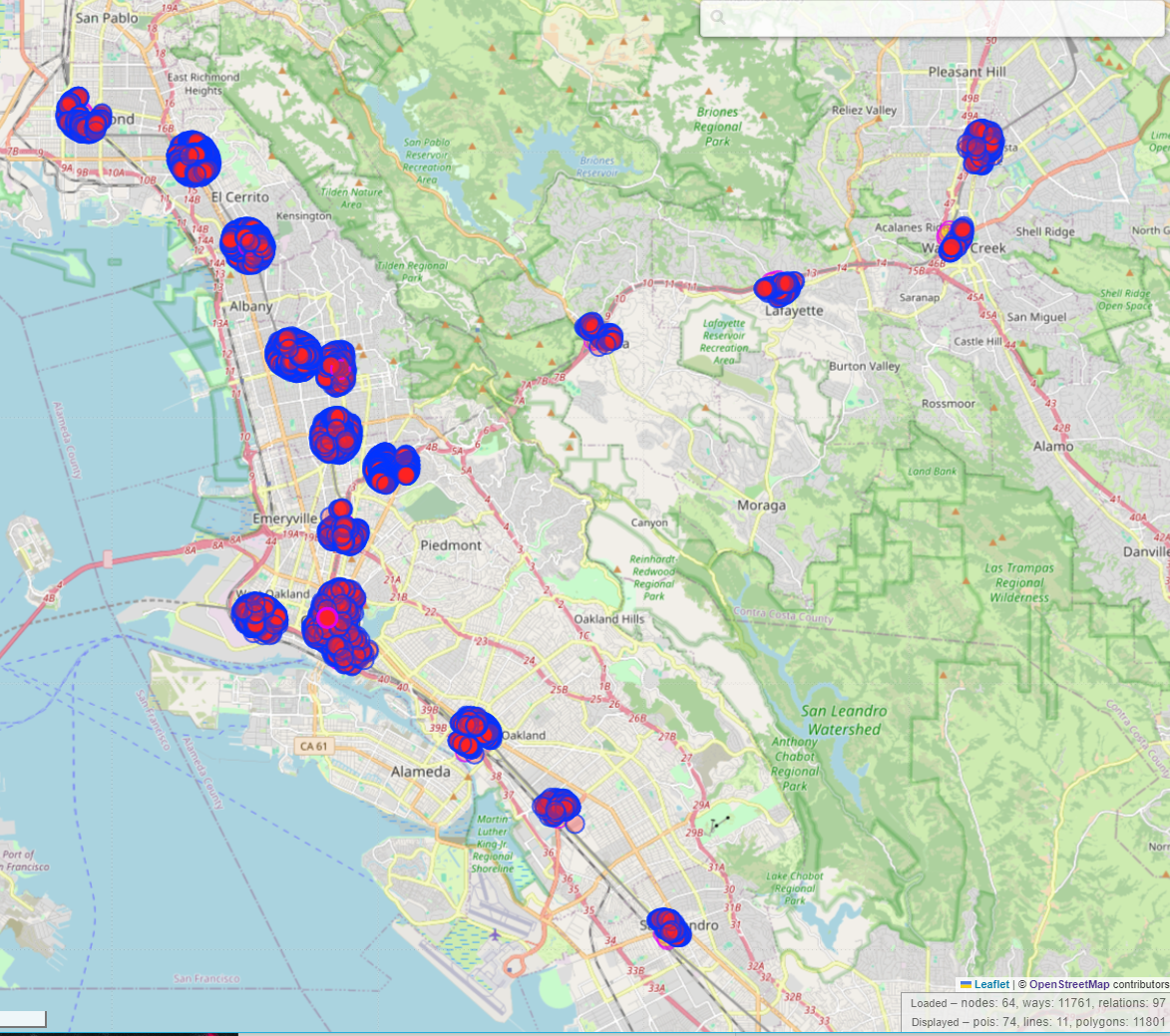
Areas within 350 m of a market and 350 m of a park
[out:json][timeout:100];
(
  nwr["shop"="supermarket"]({{bbox}});
)->.markets; out;
(
  nwr["leisure"="park"]({{bbox}});
)->.parks; out;
(
  nwr(around.parks:350)["building"]({{bbox}});
)->.buildings;
(
  nwr(around.markets:350).buildings
  ["building"!~"office|commercial|hotel|government|public|church|retail|hospital|warehouse|school"]
  ["office"!="government"]
  ["amenity"!~"conference_centre|post_depot|school|toilets|library|place_of_worship"];
);
out geom;
Find picnic tables or picnic areas
This makes use of regular expressions. The tilde ~ is used to specify a regular expression.
nwr[~"[a-z_]+"~"picnic*"]({{bbox}});
[out:json][timeout:25];
nwr[~"[a-z_]+"~"picnic*"]({{bbox}});
out body;
Shops between 9000 m - 30,000 m from a point
/*
This gathers shops within a 9000 meter (5.5 mile) radius of a given point and then subracts them from a set of shops within a 30,000 m (18.6 mile) radius.
*/
[out:json];

node(around:9000,34.03806143734478, -118.27396334026075)[shop]
    ({{bbox}})->.inner;
node(around:30000,34.03806143734478, -118.27396334026075)[shop]->.outer;

(.outer; - .inner;);

out body;
>;