Stepper motors
A stepper motor, also known as step motor or stepping motor, is a brushless DC electric motor that divides a full rotation into a number of equal steps. The motor's position can be commanded to move and hold at one of these steps without any position sensor for feedback (an open-loop controller), as long as the motor is correctly sized to the application in respect to torque and speed.
Sources: Wikipedia, Stepper Motors and Arduino: the Ultimate Guide
Strudel repo with instructions for installing locally.
How it works
The stepper motor is known for its property of converting a train of input pulses (typically square waves) into a precisely defined increment in the shaft’s rotational position. Each pulse rotates the shaft through a fixed angle.
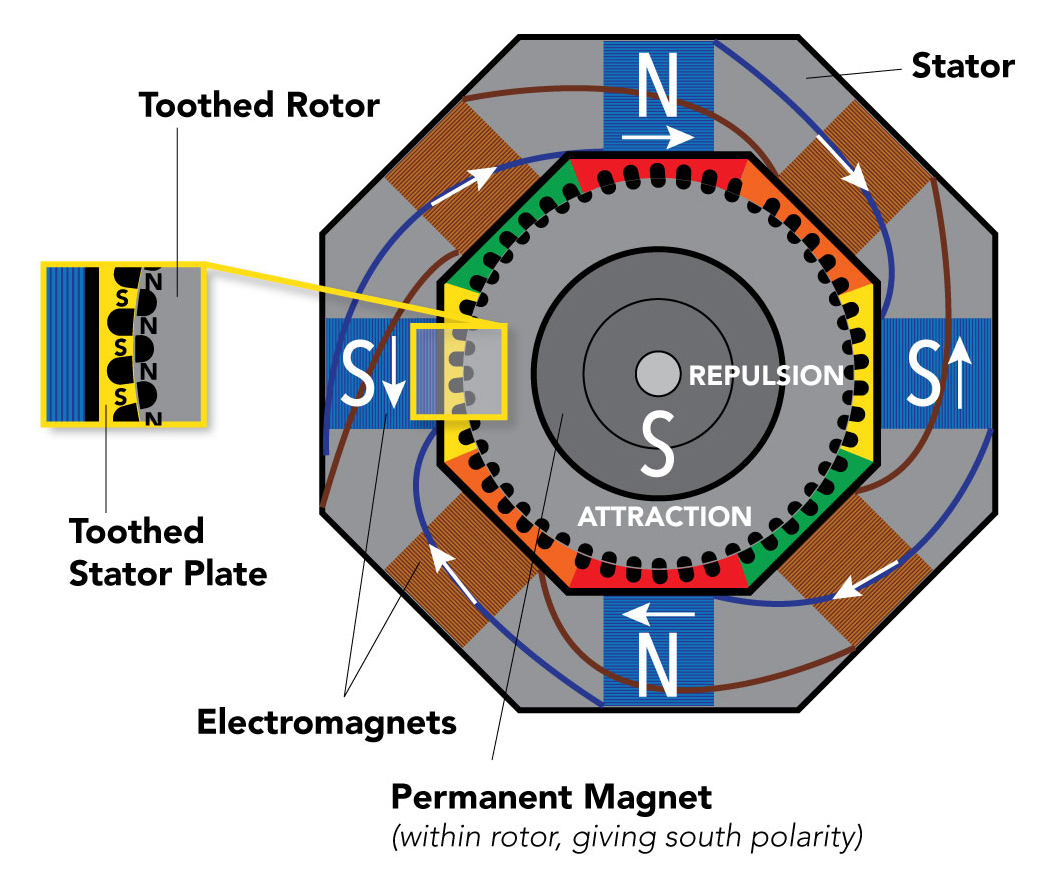
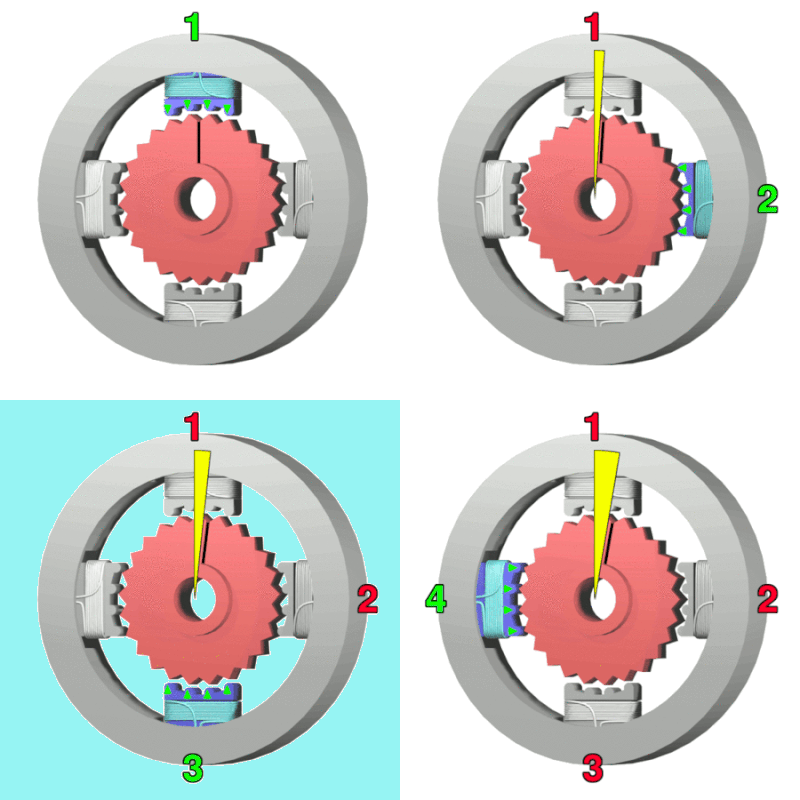
NEMA 17 has 50 steps x 4 = 200 steps / rev ( 1.8 degrees resolution)
Power requirement varies as size of stepper motor changes.
Setting current limit of drivers
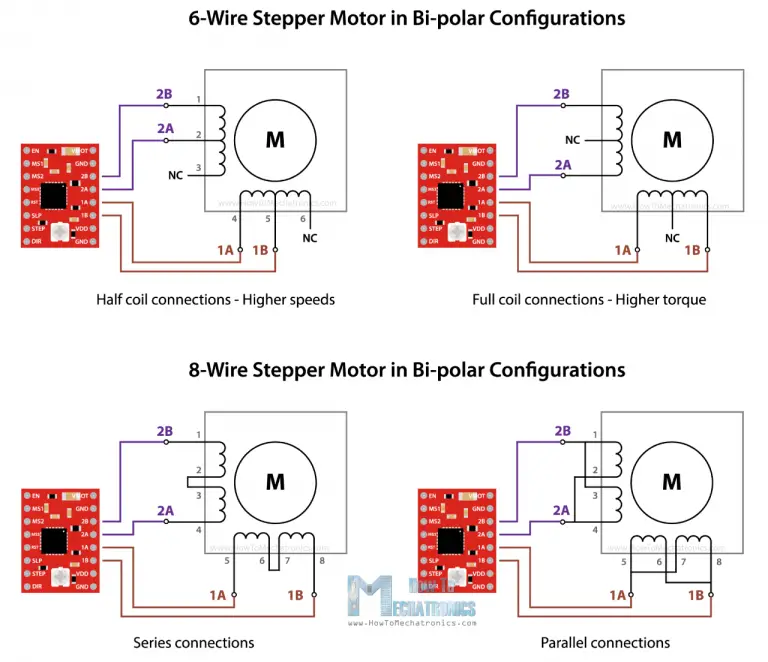
Choose suitable driver circuit according to the current rating of the stepper motor.
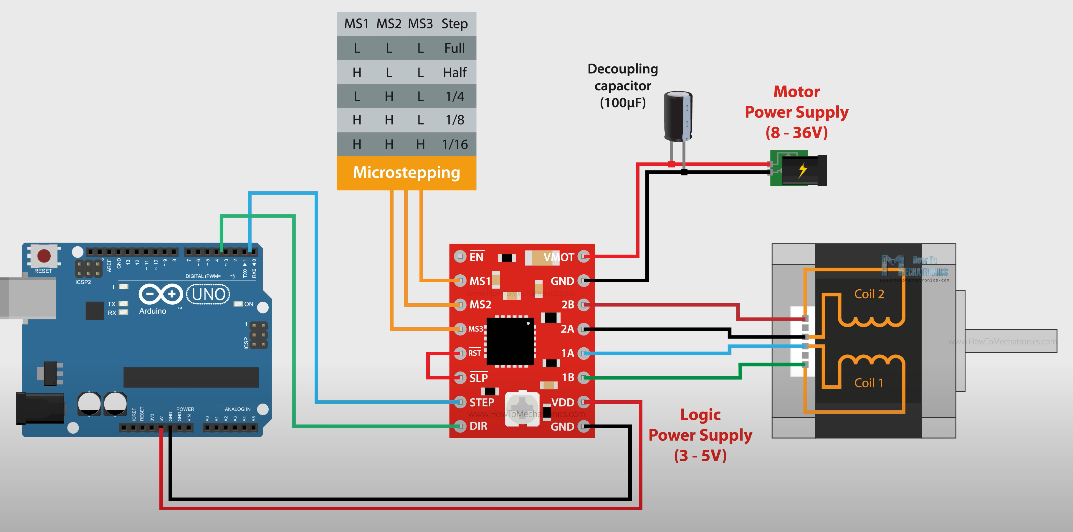
A4988 Stepper driver is the most popular for the NEMA17. Peak rating of 2A/coil (recommended ~1A). Has current limiting built in.
If the motor is rated lower than the set current of the driver the motor will overheat.
Circuit
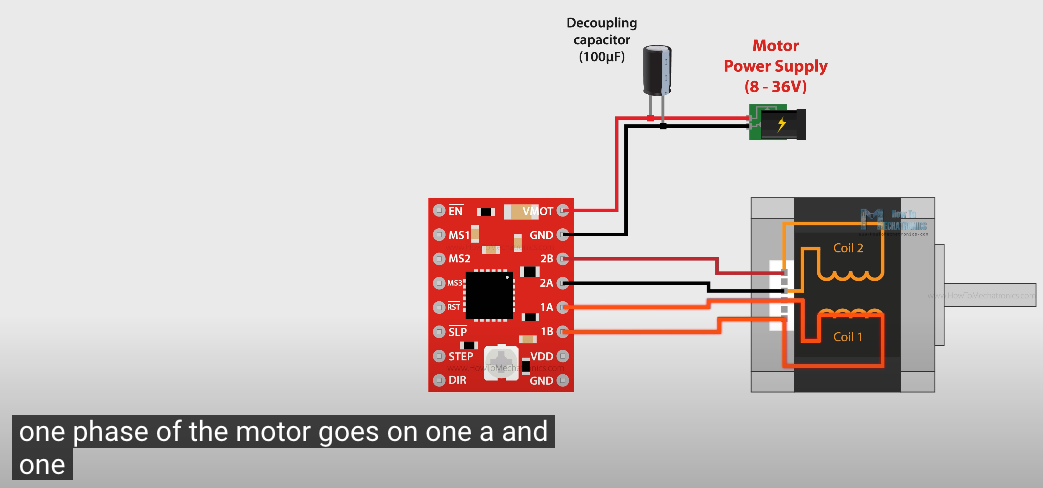
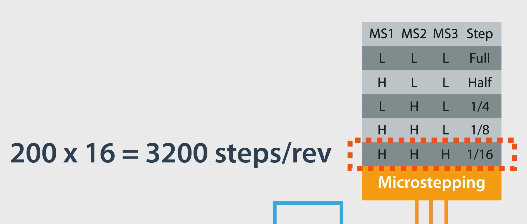
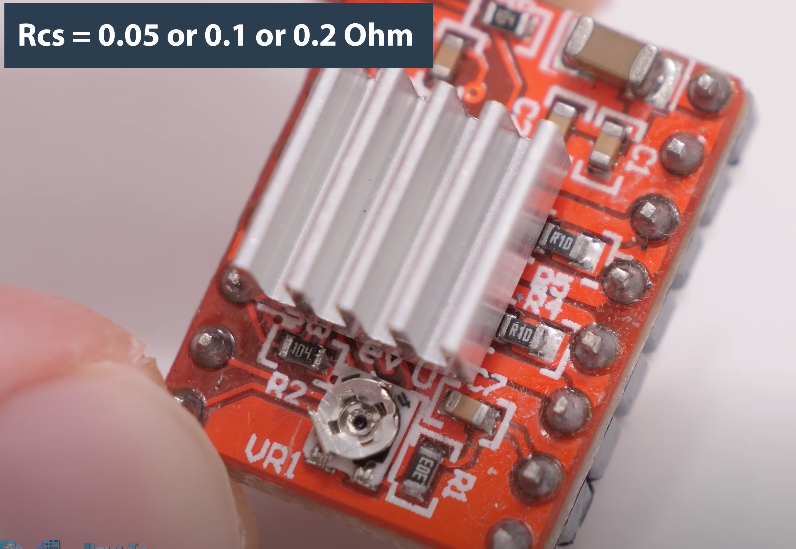
Current Limit = Vref / (8 x Rcs)
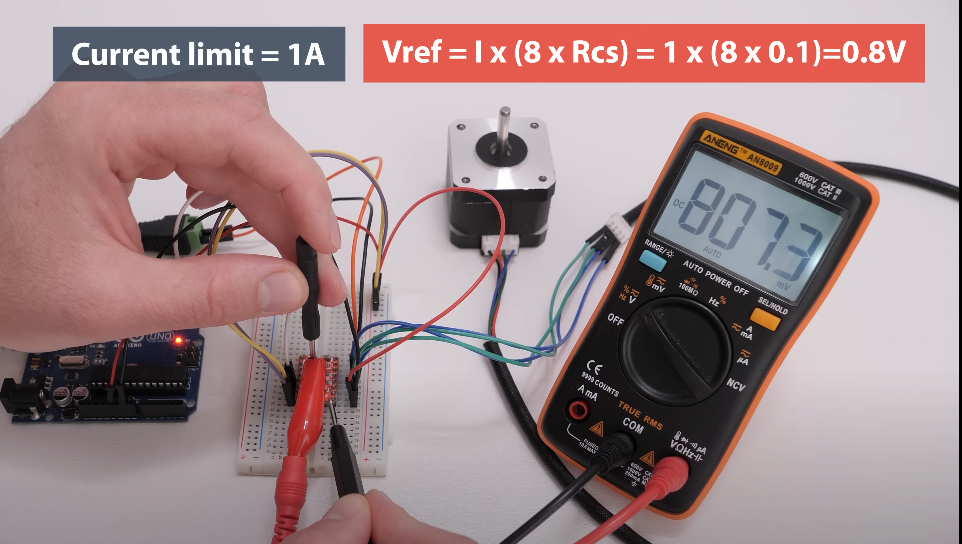
Setting current limit
Programming stepper motors
/*
 *   Basic example code for controlling a stepper without library
 *
 *   by Dejan, https://howtomechatronics.com
 */

// defines pins
#define stepPin 2
#define dirPin 5

void setup() {
  // Sets the two pins as Outputs
  pinMode(stepPin,OUTPUT);
  pinMode(dirPin,OUTPUT);
}
void loop() {
  digitalWrite(dirPin,HIGH); // Enables the motor to move in a particular direction
  // Makes 200 pulses for making one full cycle rotation
  for(int x = 0; x < 800; x++) {
    digitalWrite(stepPin,HIGH);
    delayMicroseconds(700);    // by changing this time delay between the steps we can change the rotation speed
    digitalWrite(stepPin,LOW);
    delayMicroseconds(700);
  }
  delay(1000); // One second delay

  digitalWrite(dirPin,LOW); //Changes the rotations direction
  // Makes 400 pulses for making two full cycle rotation
  for(int x = 0; x < 1600; x++) {
    digitalWrite(stepPin,HIGH);
    delayMicroseconds(500);
    digitalWrite(stepPin,LOW);
    delayMicroseconds(500);
  }
  delay(1000);
}
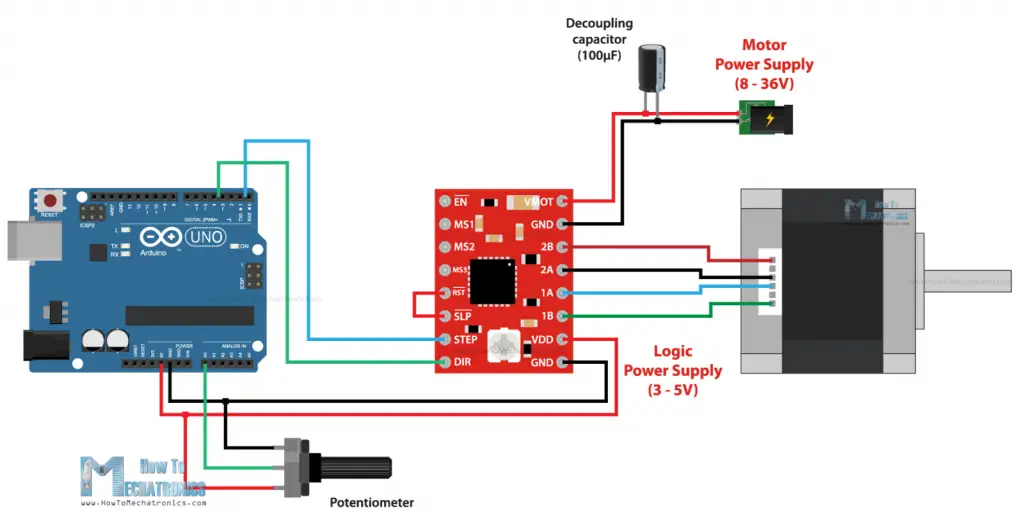
Example 2: Controlling stepper speed with potentiometer
/*
     Basic example code for controlling a stepper without library

     by Dejan, https://howtomechatronics.com
*/

// defines pins
#define stepPin 2
#define dirPin 5

int customDelay, customDelayMapped;

void setup() {
  // Sets the two pins as Outputs
  pinMode(stepPin, OUTPUT);
  pinMode(dirPin, OUTPUT);
}
void loop() {
  speedControl();
  // Makes pules with custom delay, depending on the Potentiometer, from which the speed of the motor depends
  digitalWrite(stepPin, HIGH);
  delayMicroseconds(customDelayMapped);
  digitalWrite(stepPin, LOW);
  delayMicroseconds(customDelayMapped);
}
// Custom function for reading the potentiometer and mapping its value from 300 to 3000, suitable for the custom delay value in microseconds
void speedControl() {
  customDelay = analogRead(A0); // Read the potentiometer value
  customDelayMapped = map(customDelay, 0, 1023, 300, 3000); // Convert the analog input from 0 to 1024, to 300 to 3000
}
Example: Controller Stepper Motors with AccelStepper Library
AccelStepper Library improves on the Arduino Stepper Motor library. It supports acceleration/deceleration, multiple simultaneous steppers, very slow speeds, etc
/*
 *   Basic example code for controlling a stepper with the AccelStepper library
 *
 *   by Dejan, https://howtomechatronics.com
 */

#include <AccelStepper.h>

// Define the stepper motor and the pins that is connected to
AccelStepper stepper1(1, 2, 5); // (Type of driver: with 2 pins, STEP, DIR)

void setup() {
  // Set maximum speed value for the stepper
  stepper1.setMaxSpeed(1000);
}

void loop() {
  stepper1.setSpeed((analogRead(A0));
  // Step the motor with a constant speed previously set by setSpeed();
  stepper1.runSpeed();
}
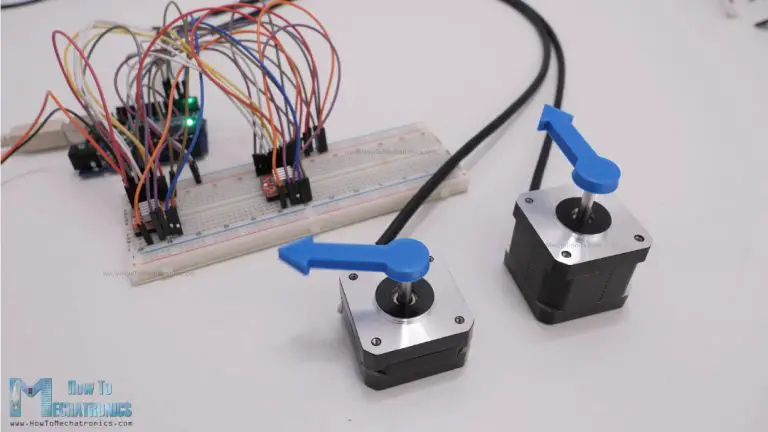
Here’s another example of controlling two stepper motors with implementing acceleration and deceleration using the AccelStepper library.
/*
    Controlling two stepper with the AccelStepper library

     by Dejan, https://howtomechatronics.com
*/

#include <AccelStepper.h>

// Define the stepper motor and the pins that is connected to
AccelStepper stepper1(1, 2, 5); // (Typeof driver: with 2 pins, STEP, DIR)
AccelStepper stepper2(1, 3, 6);

void setup() {

  stepper1.setMaxSpeed(1000); // Set maximum speed value for the stepper
  stepper1.setAcceleration(500); // Set acceleration value for the stepper
  stepper1.setCurrentPosition(0); // Set the current position to 0 steps

  stepper2.setMaxSpeed(1000);
  stepper2.setAcceleration(500);
  stepper2.setCurrentPosition(0);
}

void loop() {

  stepper1.moveTo(800); // Set desired move: 800 steps (in quater-step resolution that's one rotation)
  stepper1.runToPosition(); // Moves the motor to target position w/ acceleration/ deceleration and it blocks until is in position

  stepper2.moveTo(1600);
  stepper2.runToPosition();

  // Move back to position 0, using run() which is non-blocking - both motors will move at the same time
  stepper1.moveTo(0);
  stepper2.moveTo(0);
  while (stepper1.currentPosition() != 0 || stepper2.currentPosition() != 0) {
    stepper1.run();  // Move or step the motor implementing accelerations and decelerations to achieve the target position. Non-blocking function
    stepper2.run();
    //
    //
  }
}
Stepper Motor Music
Using stepper motors to create music is based on the principle that stepper motors produce sound when they move at different speeds. The basic idea is that the frequency of the motor's steps determines the pitch of the sound.
A stepper motor moves in discrete steps, controlled by pulses sent to its coils. The faster the pulses (step rate), the higher the frequency of movement. Middle C is 261.63 Hz so if you set the step rate to 261.63 pulses per second, its pitch will be in middle C.
Polyphony (multiple voices or simultaneous notes) can be achieved by using multiple stepper motors.
Timbre, the quality of the note, can be altered by changing the materials that are attached to the stepper motor's shaft. Example.
Related Projects
Stepper Motors
- 28byj-48